Oren Eini

CEO of RavenDB

a NoSQL Open Source Document Database

Get in touch with me:

oren@ravendb.net +972 52-548-6969

Posts: 7,640
|
Comments: 51,279
Privacy Policy · Terms
filter by tags archive
time to read 2 min | 364 words

Let us take a look at this class:

public class Trivial
{
    public void EmptyStandard()
    {

    }

    public virtual void EmptyVirtual()
    {

    }

    [MethodImpl(MethodImplOptions.NoInlining)]
    public void EmptyNoInline()
    {

    }

    [MethodImpl(MethodImplOptions.NoInlining)]
    public virtual void EmptyVirtualNoInline()
    {

    }
}

Now let us see what is the effect of using Dynamic Proxy on performance, here is the test rig:

int count = 100000000;
var trivial = new Trivial();
Stopwatch sp = Stopwatch.StartNew();
for (int i = 0; i < count; i++)
    trivial.EmptyStandard();
Console.WriteLine("EmptyStandard: " + sp.ElapsedMilliseconds);
sp.Reset();
sp.Start();
for (int i = 0; i < count; i++)
    trivial.EmptyVirtual();
Console.WriteLine("EmptyVirtual: " + sp.ElapsedMilliseconds);
sp.Reset();
sp.Start();
for (int i = 0; i < count; i++)
    trivial.EmptyNoInline();
Console.WriteLine("EmptyNoInline: " + sp.ElapsedMilliseconds);
sp.Reset();
sp.Start();
for (int i = 0; i < count; i++)
    trivial.EmptyVirtualNoInline();
Console.WriteLine("EmptyVirtualNoInline: " + sp.ElapsedMilliseconds);


trivial = (Trivial)new ProxyGenerator().CreateClassProxy(typeof (Trivial));

sp.Reset();
sp.Start();
for (int i = 0; i < count; i++)
    trivial.EmptyVirtual();
Console.WriteLine("Proxy EmptyVirtual: " + sp.ElapsedMilliseconds);


sp.Reset();
sp.Start();
for (int i = 0; i < count; i++)
    trivial.EmptyVirtualNoInline();
Console.WriteLine("Proxy EmptyVirtualNoInline: " + sp.ElapsedMilliseconds);

The result of this is:

EmptyStandard: 382
EmptyVirtual: 397
EmptyNoInline: 557
EmptyVirtualNoInline: 520
Proxy EmptyVirtual: 6628
Proxy EmptyVirtualNoInline: 6372

On first glance, it is horrible, using a proxy have a 10x perf penalty. But notice just how many times I am running the code. a hundred million times, to be able to get anything observable.

As usual, this micro benchmark basically means that I don't really care about such things :-)

time to read 3 min | 470 words

Okay, hopefully this post has caused enough interest in the subject. Let us explore what I said:

I consider hard coding as much as possible as a key concept in enabling change.

The first part that you need to notice is "as much as possible". This is another way of saying YAGNI. That is, if you don't really need it flexible, just hard code it. JFHCI is my new motto. When accepting an order, we want to give 5 percent discount for preferred members. How are we going to handle this scenario?

We will hard code it!

public void SumbitOrder()
{
	if ( User.IsPrferred ) 
		AddDiscountPrecentage(5);
	// do other interesting stuff
}

Oh, you also need to change that? Bummer, I guess we can't hard code this. And at this point, the typical reaction is usually one of the following:

  • Let us go with a rules engine!
  • Let us build a DSL!
  • We should write a framework!
  • Put it in XML!

From the tone of this post, you can probably understand that this is not something that I am going to suggest. I am going to suggest that we will still should hard code it. But this time, we should hard code it in a smart fashion.

It is easier to show the code than to explain:

public class DiscountPreferredMembers : OnOrderSubmittal
{
	public override void Execute()
	{
		if ( User.IsPreferred )	
			Order.AddDiscountPrecentage(5);
	}
}

As you can see, the business rule is still hard coded. But now we also have a structure to it. With just a tiny bit of infrastructure, we can take this code and start adding other interesting aspects to it. Deploying a DLL containing this class to a specified folder will automatically pick it up and run it at the appropriate times.

Our solution is incredibly simple. We hard code the rules, which is the easiest approach to getting things done. Because we have a structured way of doing that, we can now apply the ways in which we use it. For instance, if we wanted to support runtime replacements of rules, that is easy, all we need to do is to provide a FileSystemWatcher and reload them. If we want to add a rule, we just create a new class for that. If we want to modify a rule, we go and change the hard coded logic.

This post and the previous ones has been intentionally written in a somewhat inflammatory fashion. I want to encourage people to get used to thinking about things in the simplest possible way. Embrace hard coding, it will make your life easier.

Readability is improved, testing is easy, maintainability is a snap.

Just hard code it!

time to read 7 min | 1314 words

In many cases, intellisense is the killer feature that will make all the difference in using a language. However, it is significantly harder than just defining the syntax rules. The main problem is that we need to deal with the current context. Let us take a look at what we would like our intellisense to do for the Quote Generation DSL.

image

  • On empty line, show "specification"
  • On specification parameter, show all available modules.
  • On empty line inside specification block, show all actions (requires, users_per_machine, same_machine_as)
  • On action parameter, find appropriate value (available modules for the requires and same_machine_as actions, pre-specified user counts for the users_per_machine)

And this is for a scenario when we don't even want to deal with intellisense for the CLR API that we can use…

#Develop will give us the facilities, but it can't give us the context, this is something that we need to provide.Let us see how this works, shall we?

First, we need to decide what will invoke the intellisense. In this case, I decided to use the typical ctrl+space, so I added this:

this.editorControl.ActiveTextAreaControl.TextArea.KeyDown+=delegate(object sender, KeyEventArgs e)
{
    if (e.Control == false)
        return;
    if (e.KeyCode != Keys.Space)
        return;
    e.SuppressKeyPress = true;
    ShowIntellisense((char)e.KeyValue);
};

I don't think that this code requires any explanation, so we will move directly to the ShowIntellisense method:

private void ShowIntellisense(char value)
{
    ICompletionDataProvider completionDataProvider = new CodeCompletionProvider(this.imageList1);

    codeCompletionWindow = CodeCompletionWindow.ShowCompletionWindow(
        this,                // The parent window for the completion window
        editorControl, 	     // The text editor to show the window for
        "",	       	     // Filename - will be passed back to the provider
        completionDataProvider,// Provider to get the list of possible completions
        value		     // Key pressed - will be passed to the provider
        );
    if (this.codeCompletionWindow != null)
    {
        // ShowCompletionWindow can return null when the provider returns an empty list
        this.codeCompletionWindow.Closed += CloseCodeCompletionWindow;
    }
}

We aren't doing much here, simply invoking the facilities that #Develop gives us for intellisense. The interesting bit of work all happen in CodeCompletionProvider. There is a lot of boiler plate code there, so we will scan it shortly, and then arrive to the real interesting part:

public class CodeCompletionProvider : ICompletionDataProvider
{
    private ImageList imageList;

    public CodeCompletionProvider(ImageList imageList)
    {
        this.imageList = imageList;
    }

    public ImageList ImageList
    {
        get
        {
            return imageList;
        }
    }

    public string PreSelection
    {
        get
        {
            return null;
        }
    }

    public int DefaultIndex
    {
        get
        {
            return -1;
        }
    }

    public CompletionDataProviderKeyResult ProcessKey(char key)
    {
        if (char.IsLetterOrDigit(key) || key == '_')
        {
            return CompletionDataProviderKeyResult.NormalKey;
        }
        return CompletionDataProviderKeyResult.InsertionKey;
    }

    /// <summary>
    /// Called when entry should be inserted. Forward to the insertion action of the completion data.
    /// </summary>
    public bool InsertAction(ICompletionData data, TextArea textArea, int insertionOffset, char key)
    {
        textArea.Caret.Position = textArea.Document.OffsetToPosition(
            Math.Min(insertionOffset, textArea.Document.TextLength)
            );
        return data.InsertAction(textArea, key);
    }

    public ICompletionData[] GenerateCompletionData(string fileName, TextArea textArea, char charTyped)
    {
        return new ICompletionData[] {
             new DefaultCompletionData("Text", "Description", 0),
             new DefaultCompletionData("Text2", "Description2", 1)
        };
    }
}

The properties should be self explanatory. ProcessKey allows you decide how to handle the current keypress. Here, you get to see only normal keys (send to the actual text control) and insertion (add the current text to the text control). Another is CompletionDataProviderKeyResult.BeforeStartKey, which tells the control to ignore this key. That is important when you want to narrow the selection choice based on what the user it typing.

InsertAction simply instructs the editor in where to place the newly added text. This is important if the user enabled intellisense in the middle of a term, and you want to fix that term.

GenerateCompletionData is where the real interest lies. Everything else is just user experience, a very important detail, but basically just a detail. GenerateComletionData is where the power lies. (note, this is the appropriate Muhahaha! moment).

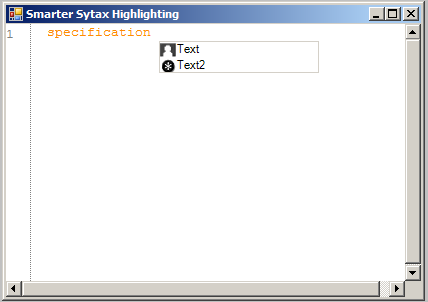
The current implementation isn't doing much, just returning a hard coded list of values. Note that even this trivial implementation, without any context whatsoever will give you a lot of value. Just because you can now expose more easily the DSL structure. And let us not forget the marketing side of that, if you have intellsense, even if none too intelligent one, you are already way ahead of the game. And here is out result:

image 

I'll go over providing the actual context for the code in another post.

time to read 1 min | 73 words

I had a discussion today about how to make change easier. My take on that was a bit of a surprise to the other guy, "Just hard code everything".

Yes, I consider hard coding as much as possible as a key concept in enabling change.

I am going to leave this as is for now, and post a continuation for that tomorrow, just to see what kind of response this has.

FUTURE POSTS

No future posts left, oh my!

RECENT SERIES

  1. API Design (10):
    29 Jan 2026 - Don't try to guess
  2. Recording (20):
    05 Dec 2025 - Build AI that understands your business
  3. Webinar (8):
    16 Sep 2025 - Building AI Agents in RavenDB
  4. RavenDB 7.1 (7):
    11 Jul 2025 - The Gen AI release
  5. Production postmorterm (2):
    11 Jun 2025 - The rookie server's untimely promotion
View all series

Syndication

Main feed ... ...
Comments feed   ... ...