



 +972 52-548-6969



The last time we looked at this issue, we built all the pieces that were required, except for the most important one, actually handling the contextual menu. I am going to be as open as possible, Intellisense is not a trivial task. Nevertheless, we can get pretty good results without investing too much time if we want to. As a reminder, here is the method that is actually responsible for the magic that is about to happen:
public ICompletionData[] GenerateCompletionData(string fileName, TextArea textArea, char charTyped)
{
        return new ICompletionData[] {
             new DefaultCompletionData("Text", "Description", 0),
             new DefaultCompletionData("Text2", "Description2", 1)
        };
}
Not terribly impressive yet, I know, but let us see what we can figure out now. First, we need to find what is the current expression that the caret is located on. That will give us the information that we need to make a decision. We could try to parse the text ourselves, or use the existing Boo Parser. However, the Boo Parser isn't really suitable for the kind of precise UI work that we need here. There are various incompatibilities along the way ( from the way it handles tabs to the nesting of expressions ). None of them is a blocker, and using the Boo Parser is likely the way you want for the more advance scenarios.
Reusing the #Develop parser gives us all the information we need, and we don't need to define things twice. Because we are going to work on a simple language, this is actually the simplest solution. Let us see what is involved in this.
public ICompletionData[] GenerateCompletionData(string fileName, TextArea textArea, char charTyped)
{
    TextWord prevNonWhitespaceTerm = FindPreviousMethod(textArea);
    if(prevNonWhitespaceTerm==null)
        return EmptySuggestion(textArea.Caret);

    var name = prevNonWhitespaceTerm.Word;
    if (name == "specification" || name == "requires" || name == "same_machine_as" || name == "@")
    {
        return ModulesSuggestions();
    }
    int temp;
    if (name == "users_per_machine" || int.TryParse(name, out temp))
    {
        return NumbersSuggestions();
    }
    return EmptySuggestion(textArea.Caret);
}

private TextWord FindPreviousMethod(TextArea textArea)
{
    var lineSegment = textArea.Document.GetLineSegment(textArea.Caret.Line);
    var currentWord = lineSegment.GetWord(textArea.Caret.Column);
    if (currentWord == null && lineSegment.Words.Count > 1)
        currentWord = lineSegment.Words[lineSegment.Words.Count - 1];
    // we actually want the previous word, not the current one, in order to make decisions on it.
    var currentIndex = lineSegment.Words.IndexOf(currentWord);
    if (currentIndex == -1)
        return null;

    return lineSegment.Words.GetRange(0, currentIndex).FindLast(word => word.Word.Trim() != "") ;
}
Again, allow me to reiterate that this is a fairly primitive solution, but it is a good one for our current needs. I am not going to go over all the suggestion methods, but here is the ModulesSuggestion method, which is responsible for the screenshot below:
private ICompletionData[] ModulesSuggestions()
{
    return new ICompletionData[]
    {
        new DefaultCompletionData("@vacations", null, 2),
        new DefaultCompletionData("@external_connections", null, 2),
        new DefaultCompletionData("@salary", null, 2),
        new DefaultCompletionData("@pension", null, 2),
        new DefaultCompletionData("@scheduling_work", null, 2),
        new DefaultCompletionData("@health_insurance", null, 2),
        new DefaultCompletionData("@taxes", null, 2),
    };
}
And this is how it looks like.
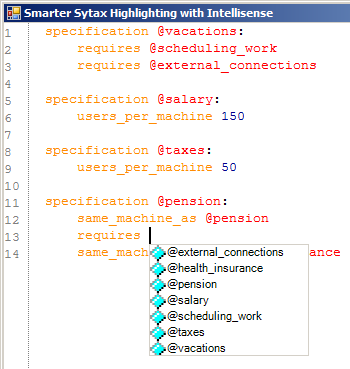
It works, it is simple, and it doesn't take too much time to build. If we want to get more than this, we probably need to start utilizing the boo parser directly, which will give us a lot more context than the text tokenizer that #Develop is using for syntax highlighter. Nevertheless, I think this is good work.