




Oren Eini

CEO of RavenDB

a NoSQL Open Source Document Database

Get in touch with me:

oren@ravendb.net +972 52-548-6969

Posts: 7,655
|
Comments: 51,282
Privacy Policy · Terms
filter by tags archive
time to read 17 min | 3273 words

We have been working with AI models for development a lot lately (yes, just like everyone else). And I’m seesawing between “damn, that’s impressive” and “damn, brainless fool” quite often.

I want to share a few scenarios in which we employed AI to write code, how it turned out, and what I think about the future of AI-generated code and its impact on software development in general.

Porting code between languages & platforms

One place where we are trying to use an AI model is making sure that the RavenDB Client API is up to date across all platforms and languages. RavenDB has a really rich client API, offering features such as Unit of Work, change tracking, caching, etc. This is pretty unique in terms of database clients, I have to say.

That is, this approach comes with a substantial amount of work required. Looking at something like Postgres as a good example, the Postgres client is responsible for sending data to and from the database. The only reason you’d need to update it is if you change the wire format, and that is something you try very hard to never do (because then you have to update a bunch of stuff, deal with compatibility concerns, etc.).

The RavenDB Client API is handling a lot of details. That means that as a user, you get much more out of the box, but we have to spend a serious amount of time & effort maintaining all the various clients that we support. At last count, we had clients for about eight or so platforms (it gets hard to track 🙂). So adding a feature on the client side means that we have to develop the feature (usually in C#), then do the annoying part of going through all the clients we have and updating them.

You have to do that for each client, for each feature. That is… a lot to ask. And it is the kind of task that is really annoying. A developer tasked with this is basically handling copy/paste more than anything else. It also requires a deep understanding of each client API’s platform (Java and Python have very different best practices, for example). That includes how to write high-performance code, idiomatic code, and an easy-to-use API for the particular platform.

In other words, you need to be both an expert and a grunt worker at the same time. This is also one of those cases that is probably absolutely perfect for an AI model. You have a very clearly defined specification (the changes that you are porting from the source client, as a git diff), and you have tests to verify that it did the right thing (you need to port those, of course).

We tried that across a bunch of different clients, and the results are both encouraging and disheartening at the same time. On the one hand, it was able to do the bulk of the work quite nicely. And the amount of work to set it up is pretty small. The problem is that it gets close, but not quite. And taking it the remaining 10% to 15% of the way is still a task you need a developer for.

For example, when moving code from C# to TypeScript, we have to deal with things like C# having both sync and async APIs, while in TypeScript we only have an async API. It created both versions (and made them both async), or it somehow hallucinated the wrong endpoints (but mostly got things right).

The actual issue here is that it is too good: you let it run for a few minutes, then you have 2,000 lines of code to review. And that is actually a problem. Most of the code is annoyingly boilerplate, but you still need to review it. The AI is able to both generate more code than you can keep up with, as well as do some weird stuff, so you need to be careful with the review.

In other words, we saved a bunch of time, but we are still subject to Amdahl's Law. Previously, we were limited by code generation, but now we are limited by the code review. And that is not something you can throw at an agent (no, not even a different one to “verify” it, that is turtles all the way down).

Sample applications & throwaway code

It turns out that we need a lot of “just once” code. For example, whenever we have a new feature out, we want to demonstrate it, and a console application is usually not enough to actually showcase the full feature.

For example, a year and a half ago, we built Hugin, a RavenDB appliance running on a Raspberry Pi Zero. That allowed us to showcase how RavenDB can run on seriously constrained hardware, as well as perform complex full-text search queries at blazing speed.

To actually show that, we needed a full-blown application that would look nice, work on mobile, and have a bunch of features so we could actually show what we have been doing. We spent a couple of thousand to make that application, IIRC, and it took a few weeks to build, test, and verify.

Last week, I built three separate demo applications using what was effectively a full vibe-coding run. The idea was to get something running that I could plug in with less than 50 lines of code that actually did something useful. It worked; it makes for an amazing demo. It also meant that I was able to have a real-world use case for the API and get a lot of important insights about how we should surface this feature to our users.

The model also generated anywhere between 1,500 and 3,000 lines of code per sample app; with fewer than 100 lines of code being written by hand. The experience of being able to go and build such an app so quickly is an intoxicating one. It is also very much a false one. It’s very easy to get stuck way up in a dirty creek, and the AI doesn’t pack any sort of paddles.

For example, I’m not a front-end guy, so I pretty much have to trust the model to do sort of the right thing, but it got stuck a few times. The width of a particular element was about half of what it should be, and repeated attempts to fix that by telling the model to make it expand to the full width of the screen just didn’t “catch”.

It got to the point that I uploaded screenshots of the problem, which made the AI acknowledge the problem, and still not fix it. Side note: the fact that I can upload a screenshot and get it to understand what is going on there is a wow moment for me.

I finally just used dev tools and figured out that there was a root div limiting the width of everything. Once I pointed this out, the model was able to figure out what magic CSS was needed to make it work.

A demo application is a perfect stage for an AI model, because I don’t actually have any other concern other than “make it work”. I don’t care about the longevity of the code, performance, accessibility, or really any of the other “-ities” you usually need to deal with. In other words, it is a write-once, then basically never maintained or worked on.

I’m also perfectly fine with going with the UI and the architecture that the AI produced. If I actually cared exactly what the application looked like, it would be a whole different story. In my experience, actually getting the model to do exactly what I want is extremely complex and usually easier to do by hand.

For sample applications, I can skip actually reviewing all this code (exceeding 10KLOC) and accept that the end result is “good enough” for me to focus on the small bits that I wrote by hand. The same cannot be said for using AI coding in most other serious scenarios.

What used to be multiple weeks and thousands of dollars in spending has now become a single day of work, and less money in AI spend than the cost of the coffee drunk by the prompter in question. That is an amazing value for this use case, but the key for me is that this isn’t something I can safely generalize to other tasks.

Writing code is not even half the battle

It’s an old adage that you shouldn’t judge a developer by how fast they can produce code, because you end up reading code a lot more than writing it. Optimizing code generation is certainly going to save us some time, but not as much as I think people believe it would.

I cited Amdahl's Law above because it fits. For a piece of code to hit production, I would say that it needs to have gone through:

  • Design & architecture
  • Coding
  • Code review
  • Unit Testing
  • Quality Assurance
  • Security
  • Performance
  • Backward & forward compatibility evaluation

The interesting thing here is that when you have people doing everything, you’ll usually just see “coding” in the Gantt chart. A lot of those required tasks are done as part of the coding process. And those things take time. Generating code quickly doesn’t give you good design, and AI is really prone to making errors that a human would rarely make.

For example, in the sample apps I mentioned, we had backend and front-end apps, which naturally worked on the same domain. At one point, I counted and I had the following files:

  • backend/models/order.ts
  • frontend/models/api-order.ts
  • frontend/models/order.ts
  • frontend/models/view-order.ts

They all represented the same-ish concept in the application, were derived from one another, and needed to be kept in sync whenever I made a change to the model. I had to explicitly instruct the model to have a single representation of the model in the entire system.

The interesting bit was that as far as the model was concerned, that wasn’t a problem. Adding a field on the backend would generate a bunch of compilation errors that it would progressively fix each time. It didn’t care about that because it could work with it. But whenever I needed to make a change, I would keep hitting this as a stumbling block.

There are two types of AI code that you’ll see, I believe. The first is code that was generated by AI, but then was reviewed and approved by a person, including taking full ownership & accountability for it. The second is basically slop, stuff that works right now but is going to be instant technical debt from day one. The equivalent of taking payday loans to pay for a face tattoo to impress your high-school crush. In other words, it’s not even good from the first day, and you’ll pay for it in so many ways down the line.

AI-generated code has no intrinsic value

A long time ago (almost 25 years) .NET didn’t have generics. If you wanted to have a strongly typed collection, you had a template that would generate it for you. You could have a template that would read a SQL database schema and generate entire data layers for you, including strongly typed models, data access objects, etc. (That is far enough back that the Repository pattern wasn’t known). It took me a while to remember that the tool I used then was called CodeSmith; there are hardly any mentions of it, but you can see an old MSDN article from the Wayback Machine to get an idea of what it was like.

You could use this approach to generate a lot of code, but no one would ever consider that code to be an actual work product, in the same sense that I don’t consider compiled code to be something that I wrote (even if I sometimes browse the machine code and make changes to affect what machine code is being generated).

In the same sense, I think that AI-generated code is something that has no real value on its own. If I can regenerate that code very quickly, it has no actual value. It is only when that code has been properly reviewed & vetted that you can actually call it valuable.

Take a look at this 128,000-line pull request, for example. The only real option here is to say: “No, thanks”. That code isn’t adding any value, and even trying to read through it is a highly negative experience.

Other costs of code

Last week, I reviewed a pull request; here is what it looked like:

No, it isn’t AI-generated code; it is just a big feature. That took me half a day to go through, think it over, etc. And I reviewed only about half of it (the rest was UI code, where me looking at the code brings no value). In other words, I would say that a proper review takes an experienced developer roughly 1K - 1.5K lines of code/hour. That is probably an estimate on the high end because I was already familiar with the code and did the final review before approving it.

Important note: that is for code that is inherently pretty simple, in an architecture I’m very familiar with. Reviewing complex code, like this review, is literally weeks of effort.

I also haven’t touched on debugging the code, verifying that it does the right thing, and ensuring proper performance - all the other “-ities” that you need to make code worthy of production.

Cost of changing the code is proportional to its size

If you have an application that is a thousand lines of code, it is trivial to make changes. If it has 10,000 lines, that is harder. When you have hundreds of thousands of lines, with intersecting features & concerns, making sweeping changes is now a lot harder.

Consider coming to a completely new codebase of 50,000 lines of code, written by a previous developer of… dubious quality. That is the sort of thing that makes people quit their jobs. That is the sort of thing that we’ll have to face if we assume, “Oh, we’ll let the model generate the app”. I think you’ll find that almost every time, a developer team would rather just start from scratch than work on the technical debt associated with such a codebase.

The other side of AI code generation is that it starts to fail pretty badly as the size of the codebase approaches the context limits. A proper architecture would have separation of concerns to ensure that when humans work on the project, they can keep enough of the system in their heads.

Most of the model-generated code that I reviewed required explicitly instructing the model to separate concerns; otherwise, it kept trying to mix concerns all the time. That worked when the codebase was small enough for the model to keep track of it. This sort of approach makes the code much harder to maintain (and reliant on the model to actually make changes).

You still need to concern yourself with proper software architecture, even if the model is the one writing most of the code. Furthermore, you need to be on guard against the model generating what amounts to “fad of the day” type of code, often with no real relation to the actual requirement you are trying to solve.

AI Agent != Junior developer

It’s easy to think that using an AI agent is similar to having junior developers working for you. In many respects, there are a lot of similarities. In both cases, you need to carefully review their work, and they require proper guidance and attention.

A major difference is that the AI often has access to a vast repository of knowledge that it can use, and it works much faster. The AI is also, for lack of a better term, an idiot. It will do strange things (like rewriting half the codebase) or brute force whatever is needed to get the current task done, at the expense of future maintainability.

The latter problem is shared with junior developers, but they usually won’t hand you 5,000 lines of code that you first have to untangle (certainly not if you left them alone for the time it takes to get a cup of coffee).

The problem is that there is a tendency to accept generated code as given, maybe with a brief walkthrough or basic QA, before moving to the next step. That is a major issue if you go that route; it works for one-offs and maybe the initial stages of greenfield applications, but not at all for larger projects.

You should start by assuming that any code accepted into the project without human review is suspect, and treat it as such. Failing to do so will lead to ever-deeper cycles of technical debt. In the end, your one-month-old project becomes a legacy swamp that you cannot meaningfully change.

This story made the rounds a few times, talking about a non-technical attempt to write a SaaS system. It was impressive because it had gotten far enough along for people to pay for it, and that was when people actually looked at what was going on… and it didn’t end well.

As an industry, we are still trying to figure out what exactly this means, because AI coding is undeniably useful. It is also a tool that has specific use cases and limitations that are not at all apparent at first or even second glance.

AI-generated code vs. the compiler

Proponents of AI coding have a tendency to talk about AI-generated code in the same way they treat compiled code. The machine code that the compiler generates is an artifact and is not something we generally care about. That is because the compiler is deterministic and repeatable.

If two developers compile the same code on two different machines, they will end up with the same output. We even have a name for Reproducible Builds, which ensure that separate machines generate bit-for-bit identical output. Even when we don’t achieve that (getting to reproducible builds is a chore), the code is basically the same. The same code behaving differently after each compilation is a bug in the compiler, not something you accept.

That isn’t the same with AI. Running the same prompt twice will generate different output, sometimes significantly so. Running a full agentic process to generate a non-trivial application will result in compounding changes to the end result.

In other words, it isn’t that you can “program in English”, throw the prompts into source control, and treat the generated output as an artifact that you can regenerate at any time. That is why the generated source code needs to be checked into source control, reviewed, and generally maintained like manually written code.

The economic value of AI code gen is real, meaningful and big

I want to be clear here: I think that there is a lot of value in actually using AI to generate code - whether it’s suggesting a snippet that speeds up manual tasks or operating in agent mode and completing tasks more or less independently.

The fact that I can do in an hour what used to take days or weeks is a powerful force multiplier. The point I’m trying to make in this post is that this isn’t a magic wand. There is also all the other stuff you need to do, and it isn’t really optional for production code.

Summary

In short, you cannot replace your HR department with an IT team managing a bunch of GPUs. Certainly not now, and also not in any foreseeable future. It is going to have an impact, but the cries about “the sky is falling” that I hear about the future of software development as a profession are… about as real as your chance to get rich from paying large sums of money for “ownership” of a cryptographic hash of a digital ape drawing.

time to read 2 min | 349 words

I wanted to add a data point about how AI usage is changing the way we write software. This story is from last week.

We recently had a problem getting two computers to communicate with each other. RavenDB uses X.509 certificates for authentication, and the scenario in question required us to handle trusting an unknown certificate. The idea was to accomplish this using a trusted intermediate certificate. The problem was that we couldn’t get our code (using .NET) to send the intermediate certificate to the other side.

I tried using two different models and posed the question in several different ways. It kept circling back to the same proposed solution (using X509CertificateCollection with both the client certificate and its signer added to it), but the other side would only ever see the leaf certificate, not the intermediate one.

I know that you can do that using TLS, because I have had to deal with such issues before. At that point, I gave up on using an AI model and just turned to Google to search for what I wanted to do. I found some old GitHub issues discussing this (from 2018!) and was then able to find the exact magic incantation needed to make it work.

For posterity’s sake, here is what you need to do:


var options = new SslClientAuthenticationOptions
{
   TargetHost = "localhost",
   ClientCertificates = collection,
   EnabledSslProtocols = SslProtocols.Tls13,
   ClientCertificateContext = SslStreamCertificateContext.Create(
clientCert, 
[intermdiateCertificate], 
offline: true)
};

The key aspect from my perspective is that the model was not only useless, but also actively hostile to my attempt to solve the problem. It’s often helpful, but we need to know when to cut it off and just solve things ourselves.

time to read 3 min | 423 words

You are assigned the following story:

As a helpdesk manager,I want the system to automatically assign incoming tickets to available agents in a round-robin manner,so that tickets are distributed evenly and handled efficiently.

That sounds like a pretty simple task, right? Now, let’s get to implementing this. A junior developer will read this story and realize that you need to know who the available agents are and who the last assigned agent was.

Then you realize that you also need to handle more complex scenarios:

  • What if you have a lot of available agents?
  • What if we have two concurrent tickets at the same time?
  • Where do you keep the last assigned agent?
  • What if an agent goes unavailable and then becomes available again?
  • How do you handle a lot of load on the system?
  • What happens if we need to assign a ticket in a distributed manner?

There are answers to each one of those, mind you. It is just that it turns out that round-robin distribution is actually really hard if you want to do that properly.

A junior developer will try to implement the story as written, maybe they know enough to recognize the challenges listed above. If they are good, they will also be able to solve those issues.

A senior developer, in my eyes, would write the following instead:


from Agents
where State = 'Available'
order by random()
limit 1

In other words, instead of trying to do “proper” round-robin distribution, with all its attendant challenges, we can achieve pretty much the same thing with far less hassle.

The key difference here is that you need to challenge the requirements, because by changing what you need to do, you can greatly simplify your problem. You end up with a great solution that meets all the users’ requirements (in contrast to what was written in the user story) and introduces almost no complexity.

A good way to do this, by the way, is to reject the story outright and talk to its owner. “You say round-robin here, can I do that randomly? It ends up being the same in the end.”

There may be a reason that mandates the round-robin nature, but if there is such a reason, I can absolutely guarantee that there are additional constraints here that are not expressed in the round-robin description.

That aspect, challenging the problem itself, is a key part of what makes a senior developer more productive. Not just understanding the problem space, but reframing it to make it easier to solve while delivering the same end result.

time to read 2 min | 394 words

I build databases for a living, and as such, I spend a great deal of time working with file I/O. Since the database I build is cross-platform, I run into different I/O behavior on different operating systems all the time.

One of the more annoying aspects for a database developer is handling file metadata changes between Windows and Linux (and POSIX in general). You can read more about the details in this excellent post by Dan Luu.

On Windows, the creation of a new file is a reliable operation.If the operation succeeds, the file exists. Note that this is distinct from when you write data to it, which is a whole different topic. The key here is that file creation, size changes, and renames are things that you can rely on.

On Linux, on the other hand, you also need to sync the parent directory (potentially all the way up the tree, by the way). The details depend on what exact file system you have mounted and exactly which flags you are using, etc.

This difference in behavior between Windows and Linux is probably driven by the expected usage, or maybe the expected usage drove the behavior. I guess it is a bit of a chicken-and-egg problem.

It’s really common in Linux to deal with a lot of small files that are held open for a very short time, while on Windows, the recommended approach is to create file handles on an as-needed basis and hold them.

The cost of CreateFile() on Windows is significantly higher than open() on Linux. On Windows, each file open will typically run through a bunch of filters (antivirus, for example), which adds significant costs.

Usually, when this topic is raised, the main drive is that Linux is faster than Windows. From my perspective, the actual issue is more complex. When using Windows, your file I/O operations are much easier to reason about than when using Linux. The reason behind that, mind you, is probably directly related to the performance differences between the operating systems.

In both cases, by the way, the weight of legacy usage and inertia means that we cannot get anything better these days and will likely be stuck with the same underlying issues forever.

Can you imagine what kind of API we would have if we had a new design as a clean slate on today’s hardware?

time to read 2 min | 342 words

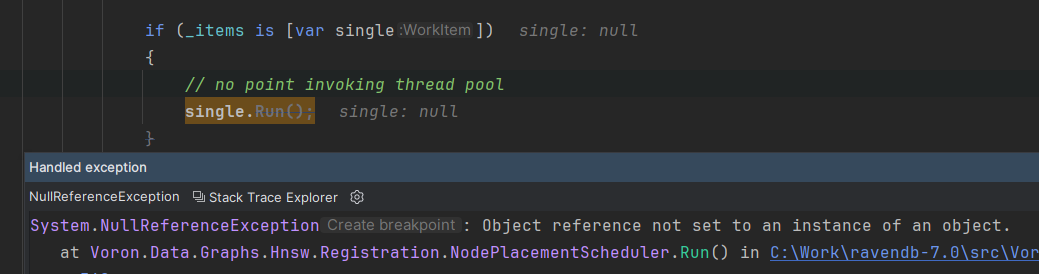
I wrote the following code:


if (_items is [var single])
{
    // no point invoking thread pool
    single.Run();
}

And I was very proud of myself for writing such pretty and succinct C# code.

Then I got a runtime error:

I asked Grok about this because I did not expect this, and got the following reply:

No, if (_items is [var single]) in C# does not match a null value. This pattern checks if _items is a single-element array and binds the element to single. If _items is null, the pattern match fails, and the condition evaluates to false.

However, the output clearly disagreed with both Grok’s and my expectations. I decided to put that into SharpLab, which can quickly help identify what is going on behind the scenes for such syntax.

You can see three versions of this check in the associated link.


if(strs is [var s]) // no null check


if(strs is [string s]) //  if (s != null)


if(strs is [{} s]) //  if (s != null)

Turns out that there is a distinction between a var pattern (allows null) and a non-var pattern. The third option is the non-null pattern, which does the same thing (but doesn’t require redundant type specification). Usually var vs. type is a readability distinction, but here we have a real difference in behavior.

Note that when I asked the LLM about it, I got the wrong answer. Luckily, I could get a verified answer by just checking the compiler output, and only then head out to the C# spec to see if this is a compiler bug or just a misunderstanding.

time to read 2 min | 218 words

RavenDB is a pretty big system, with well over 1 million lines of code. Recently, I had to deal with an interesting problem. I had a CancellationToken at hand, which I expected to remain valid for the duration of the full operation.

However, something sneaky was going on there. Something was cancelling my CancelationToken, and not in an expected manner. At last count, I had roughly 2 bazillion CancelationTokens in the RavenDB codebase. Per request, per database, global to the server process, time-based, operation-based, etc., etc.

Figuring out why the CancelationToken was canceled turned out to be a chore. Instead of reading through the code, I cheated.


token.Register(() =>
{
    Console.WriteLine("Cancelled!" + Environment.StackTrace);
});

I ran the code, tracked back exactly who was calling cancel, and realized that I had mixed the request-based token with the database-level token. A single line fix in the end. Until I knew where it was, it was very challenging to figure it out.

This approach, making the code tell you what is wrong, is an awesome way to cut down debugging time by a lot.

time to read 1 min | 146 words

Cloud service costs can often be confusing and unpredictable.RavenDB Cloud's new feature addresses this by providing real-time cost predictions whenever you make changes to your system. This transparency allows you to make informed choices about your cluster and easily incorporate cost considerations into your decision loop to take control of your cloud budget..

The implementation of cost transparency and visibility features within RavenDB Cloud has an outsized impact on cost management and FinOps practices. It empowers you to make informed decisions, optimize spending, and achieve better financial control.

The idea is to make it easier for you to spend your money wisely. I’m really happy with this feature. It may seem small, but it will make a difference. It also fits very well with our overall philosophy that we should take the burden of complexity off your shoulders and onto ours.

time to read 8 min | 1522 words

There are at least 3 puns in the title of this blog post. I’m sorry, but I’m writing this after several days of tracking an impossible bug. I’m actually writing a set of posts to wind down from this hunt, so you’ll have to suffer through my more prosaic prose.

This bug is the kind that leaves you questioning your sanity after days of pursuit, the kind that I’m sure I’ll look back on and blame for any future grey hair I have. I’m going to have another post talking about the bug since it is such a doozy. In this post, I want to talk about the general approach I take when dealing with something like this.

Beware, this process involves a lot of hair-pulling. I’m saving that for when the real nasties show up.

The bug in question was a race condition that defied easy reproduction. It didn’t show up consistently—sometimes it surfaced, sometimes it didn’t. The only “reliable” way to catch it was by running a full test suite, which took anywhere from 8 to 12 minutes per run. If the suite hung, we knew we had a hit. But that left us with a narrow window to investigate before the test timed out or crashed entirely. To make matters worse, the bug was in new C code called from a .NET application.

New C code is a scary concept. New C code that does multithreading is an even scarier concept. Race conditions there are almost expected, right?

That means that the feedback cycle is long. Any attempt we make to fix it is going to be unreliable - “Did I fix it, or it just didn’t happen?” and there isn’t a lot of information going on.The first challenge was figuring out how to detect the bug reliably.

Using Visual Studio as the debugger was useless here—it only reproduced in release mode, and even with native debugging enabled, Visual Studio wouldn’t show the unmanaged code properly. That left us blind to the C library where the bug resided. I’m fairly certain that there are ways around that, but I was more interested in actually getting things done than fighting the debugger.

We got a lot of experience with WinDbg, a low-level debugger and a real powerhouse. It is also about as friendly as a monkey with a sore tooth and an alcohol addiction. The initial process was all about trying to reproduce the hang and then attach WinDbg to it.

Turns out that we never actually generated PDBs for the C library. So we had to figure out how to generate them, then how to carry them all the way from the build to the NuGet package to the deployment for testing - to maybe reproduce the bug again. Then we could see in what area of the code we are even in.

Getting WinDbg attached is just the start; we need to sift through the hundreds of threads running in the system. That is where we actually started applying the proper process for this.

This piece of code is stupidly simple, but it is sufficient to reduce “what thread should I be looking at” from 1 - 2 minutes to 5 seconds.


SetThreadDescription(GetCurrentThread(), L"Rvn.Ring.Wrkr");

I had the thread that was hanging, and I could start inspecting its state. This was a complex piece of code, so I had no idea what was going on or what the cause was. This is when we pulled the next tool from our toolbox.


void alert() {
    while (1) {
        Beep(800, 200);
        Sleep(200);
    }
}

This isn’t a joke, it is a super important aspect. In WinDbg, we noticed some signs in the data that the code was working on, indicating that something wasn’t right. It didn’t make any sort of sense, but it was there. Here is an example:


enum state
{
  red,
  yellow,
  green
};


enum state _currentState;

And when we look at it in the debugger, we get:


0:000> dt _currentState
Local var @ 0x50b431f614 Type state
17 ( banana_split )

That is beyond a bug, that is some truly invalid scenario. But that also meant that I could act on it. I started adding things like this:


if(_currentState != red && 
   _currentState != yellow && 
   _currentState != green) {
   alert();
}

The end result of this is that instead of having to wait & guess, I would now:

  • Be immediately notified when the issue happened.
  • Inspect the problematic state earlier.
  • Hopefully glean some additional insight so I can add more of those things.

With this in place, we iterated. Each time we spotted a new behavior hinting at the bug’s imminent trigger, we put another call to the alert function to catch it earlier. It was crude but effective—progressively tightening the noose around the problem.

Race conditions are annoyingly sensitive; any change to the system—like adding debug code—alters its behavior. We hit this hard. For example, we’d set a breakpoint in WinDbg, and the alert function would trigger as expected. The system would beep, we’d break in, and start inspecting the state. But because this was an optimized release build, the debugging experience was a mess. Variables were often optimized away into registers or were outright missing, leaving us to guess what was happening.

I resorted to outright hacks like this function:


__declspec(noinline) void spill(void* ptr) {
    volatile void* dummy = ptr;
    dummy; // Ensure dummy isn't flagged as unused
}

The purpose of this function is to force the compiler to assign an address to a value. Consider the following code:


if (work->completed != 0) {
    printf("old_global_state : %p, current state: %p\n",
         old_global_state, handle_ptr->global_state);
    alert();
    spill(&work);
}

Because we are sending a pointer to the work value to the spill function, the compiler cannot just put that in a register and must place it on the stack. That means that it is much easier to inspect it, of course.

Unfortunately, adding those spill calls led to the problem being “fixed”, we could no longer reproduce it. Far more annoyingly, any time that we added any sort of additional code to try to narrow down where this was happening, we had a good chance of either moving the behavior somewhere completely different or masking it completely.

Here are some of our efforts to narrow it down, if you want to see what the gory details look like.

At this stage, the process became a grind. We’d hypothesize about the bug’s root cause, tweak the code, and test again. Each change risked shifting the race condition’s timing, so we’d often see the bug vanish, only to reappear later in a slightly different form. The code quality suffered—spaghetti logic crept in as we layered hacks on top of hacks. But when you’re chasing a bug like this, clean code takes a back seat to results. The goal is to understand the failure, not to win a style award.

Bug hunting at this level is less about elegance and more about pragmatism. As the elusiveness of the bug increases, so does code quality and any other structured approach to your project. The only thing on your mind is, how do I narrow it down?. How do I get this chase to end?

Next time, I’ll dig into the specifics of this particular bug. For now, this is the high-level process: detect, iterate, hack, and repeat. No fluff—just the reality of the chase. The key in any of those bugs that we looked at is to keep narrowing the reproduction to something that you can get in a reasonable amount of time.

Once that happens, when you can hit F5 and get results, this is when you can start actually figuring out what is going on.

time to read 18 min | 3547 words

This post isn’t actually about a production issue—thankfully, we caught this one during testing. It’s part of a series of blog posts that are probably some of my favorite posts to write. Why? Because when I’m writing one, it means I’ve managed to pin down and solve a nasty problem.

 This time, it’s a race condition in RavenDB that took mountains of effort, multiple engineers, and a lot of frustration to resolve.

For the last year or so, I’ve been focused on speeding up RavenDB’s core performance, particularly its IO handling. You might have seen my earlier posts about this effort. One key change we made was switching RavenDB’s IO operations to use IO Ring, a new API designed for high-performance, asynchronous IO, and other goodies. If you’re in the database world and care about squeezing every ounce of performance out of your system, this is the kind of thing that you want to use.

This wasn’t a small tweak. The pull request for this work exceeded 12,000 lines of code—over a hundred commits—and likely a lot more code when you count all the churn. Sadly, this is one of those changes where we can’t just split the work into digestible pieces. Even now, we still have some significant additional work remaining to do.

We had two or three of our best engineers dedicated to it, running benchmarks, tweaking, and testing over the past few months. The goal is simple: make RavenDB faster by any means necessary.

And we succeeded, by a lot (and yes, more on that in a separate post). But speed isn’t enough; it has to be correct too. That’s where things got messy.

Tests That Hang, Sometimes

We noticed that our test suite would occasionally hang with the new code. Big changes like this—ones that touch core system components and take months to implement—often break things. That’s expected, and it’s why we have tests. But these weren’t just failures; sometimes the tests would hang, crash, or exhibit other bizarre behavior. Intermittent issues are the worst. They scream “race condition,” and race conditions are notoriously hard to track down.

Here’s the setup. IO Ring isn’t available in managed code, so we had to write native C code to integrate it. RavenDB already has a Platform Abstraction Layer (PAL) to handle differences between Windows, Linux, and macOS, so we had a natural place to slot this in.

The IO Ring code had to be multithreaded and thread-safe. I’ve been writing system-level code for over 20 years, and I still get uneasy about writing new multithreaded C code. It’s a minefield. But the performance we could get… so we pushed forward… and now we had to see where that led us.

Of course, there was a race condition. The actual implementation was under 400 lines of C code—deliberately simple, stupidly obvious, and easy to review. The goal was to minimize complexity: handle queuing, dispatch data, and get out. I wanted something I could look at and say, “Yes, this is correct.” I absolutely thought that I had it covered.

We ran the test suite repeatedly. Sometimes it passed; sometimes it hung; rarely, it would crash.

When we looked into it, we were usually stuck on submitting work to the IO Ring. Somehow, we ended up in a state where we pushed data in and never got called back. Here is what this looked like.


0:019> k
 #   Call Site
00   ntdll!ZwSubmitIoRing
01   KERNELBASE!ioring_impl::um_io_ring::Submit+0x73
02   KERNELBASE!SubmitIoRing+0x3b
03   librvnpal!do_ring_work+0x16c 
04   KERNEL32!BaseThreadInitThunk+0x17
05   ntdll!RtlUserThreadStart+0x2c

In the previous code sample, we just get the work and mark it as done. Now, here is the other side, where we submit the work to the worker thread.


int32_t rvn_write_io_ring(void* handle, int32_t count, 
        int32_t* detailed_error_code)
{
        int32_t rc = 0;
        struct handle* handle_ptr = handle;
        EnterCriticalSection(&handle_ptr->global_state->lock);
        ResetEvent(handle_ptr->global_state->notify);
        char* buf = handle_ptr->global_state->arena;
        struct workitem* prev = NULL;
        for (int32_t curIdx = 0; curIdx < count; curIdx++)
        {
                struct workitem* work = (struct workitem*)buf;
                buf += sizeof(struct workitem);
                *work = (struct workitem){
                        .prev = prev,
                        .notify = handle_ptr->global_state->notify,
                };
                prev = work;
                queue_work(work);
        }
        SetEvent(IoRing.event);


        bool all_done = false;
        while (!all_done)
        {
                all_done = true;
                WaitForSingleObject(handle_ptr->global_state->notify, INFINITE)
                ResetEvent(handle_ptr->global_state->notify);
                struct workitem* work = prev;
                while (work)
                {
                        all_done &= InterlockedCompareExchange(
&work->completed, 0, 0);
                        work = work->prev;
                }
        }


        LeaveCriticalSection(&handle_ptr->global_state->lock);
        return rc;
}

We basically take each page we were asked to write and send it to the worker thread for processing, then we wait for the worker to mark all the requests as completed. Note that we play a nice game with the prev and next pointers. The next pointer is used by the worker thread while the prev pointer is used by the submitter thread.

You can also see that this is being protected by a critical section (a lock) and that there are clear hand-off segments. Either I own the memory, or I explicitly give it to the background thread and wait until the background thread tells me it is done. There is no place for memory corruption. And yet, we could clearly get it to fail.

Being able to have a small reproduction meant that we could start making changes and see whether it affected the outcome. With nothing else to look at, we checked this function:


void queue_work_origin(struct workitem* work)
{
    work->next = IoRing.head;
    while (true)
    {
        struct workitem* cur_head = InterlockedCompareExchangePointer(
                        &IoRing.head, work, work->next);
        if (cur_head == work->next)
            break;
        work->next = cur_head;
    }
}

I have written similar code dozens of times, I very intentionally made the code simple so it would be obviously correct. But when I even slightly tweaked the queue_work function, the issue vanished. That wasn’t good enough, I needed to know what was going on.

Here is the “fixed” version of the queue_work function:


void queue_work_fixed(struct workitem* work)
{
        while (1)
        {
                struct workitem* cur_head = IoRing.head;
                work->next = cur_head;
                if (InterlockedCompareExchangePointer(
&IoRing.head, work, cur_head) == cur_head)
                        break;
        }
}

This is functionally the same thing. Look at those two functions! There shouldn’t be a difference between them. I pulled up the assembly output for those functions and stared at it for a long while.


1 work$ = 8
 2 queue_work_fixed PROC                             ; COMDAT
 3        npad    2
 4 $LL2@queue_work:
 5        mov     rax, QWORD PTR IoRing+32
 6        mov     QWORD PTR [rcx+8], rax
 7        lock cmpxchg QWORD PTR IoRing+32, rcx
 8        jne     SHORT $LL2@queue_work
 9        ret     0
10 queue_work_fixed ENDP

A total of ten lines of assembly. Here is what is going on:

  • Line 5 - we read the IoRing.head into register rax (representing cur_head).
  • Line 6 - we write the rax register (representing cur_head) to work->next.
  • Line 7 - we compare-exchange the value of IoRing.head with the value in rcx (work) using rax (cur_head) as the comparand.
  • Line 8 - if we fail to update, we jump to line 5 again and re-try.

That is about as simple a code as you can get, and exactly expresses the intent in the C code. However, if I’m looking at the original version, we have:


1 work$ = 8
 2 queue_work_origin PROC                               ; COMDAT
 3         npad    2
 4 $LL2@queue_work_origin:
 5         mov     rax, QWORD PTR IoRing+32
 6         mov     QWORD PTR [rcx+8], rax
;                        ↓↓↓↓↓↓↓↓↓↓↓↓↓ 
 7         mov     rax, QWORD PTR IoRing+32
;                        ↑↑↑↑↑↑↑↑↑↑↑↑↑
 8         lock cmpxchg QWORD PTR IoRing+32, rcx
 9         cmp     rax, QWORD PTR [rcx+8]
10         jne     SHORT $LL2@queue_work_origin
11         ret     0
12 queue_work_origin ENDP

This looks mostly the same, right? But notice that we have just a few more lines. In particular, lines 7, 9, and 10 are new. Because we are using a field, we cannot compare to cur_head directly like we previously did but need to read work->next again on lines 9 &10. That is fine.

What is not fine is line 7. Here we are reading IoRing.headagain, and work->next may point to another value. In other words, if I were to decompile this function, I would have:


void queue_work_origin_decompiled(struct workitem* work)
{
    while (true)
    {
        work->next = IoRing.head;
//                        ↓↓↓↓↓↓↓↓↓↓↓↓↓ 
        struct workitem* tmp = IoRing.head;
//                        ↑↑↑↑↑↑↑↑↑↑↑↑↑
        struct workitem* cur_head = InterlockedCompareExchangePointer(
                        &IoRing.head, work, tmp);
        if (cur_head == work->next)
            break;
    }
}

Note the new tmp variable? Why is it reading this twice? It changes the entire meaning of what we are trying to do here.

You can look at the output directly in the Compiler Explorer.

This smells like a compiler bug. I also checked the assembly output of clang, and it doesn’t have this behavior.

I opened a feedback item with MSVC to confirm, but the evidence is compelling. Take a look at this slightly different version of the original. Instead of using a global variable in this function, I’m passing the pointer to it.


void queue_work_origin_pointer(
struct IoRingSetup* ring, struct workitem* work)
{
        while (1)
        {
                struct workitem* cur_head = ring->head;
                work->next = cur_head;
                if (InterlockedCompareExchangePointer(
&ring->head, work, work->next) ==  work->next)
                        break;
        }
}

And here is the assembly output, without the additional load.


ring$ = 8
work$ = 16
queue_work_origin PROC                              ; COMDAT
        prefetchw BYTE PTR [rcx+32]
        npad    12
$LL2@queue_work:
        mov     rax, QWORD PTR [rcx+32]
        mov     QWORD PTR [rdx+8], rax
        lock cmpxchg QWORD PTR [rcx+32], rdx
        cmp     rax, QWORD PTR [rdx+8]
        jne     SHORT $LL2@queue_work
        ret     0
queue_work_origin ENDP

That unexpected load was breaking our thread-safety assumptions, and that led to a whole mess of trouble. Violated invariants are no joke.

The actual fix was pretty simple, as you can see. Finding it was a huge hurdle. The good news is that I got really familiar with this code, to the point that I got some good ideas on how to improve it further 🙂.

time to read 1 min | 103 words

We just announced the general availability of RavenDB on AWS Marketplace.

By joining AWS Marketplace, we provide users with a seamless purchasing experience, flexible deployment options, and direct integration with their AWS billing.

You can go directly to RavenDB on AWS Marketplace here.

That means:

  • One-click cluster deployment
  • Easy scaling for growing workloads
  • High-availability and security on AWS

Most importantly, being a partner in AWS Marketplace allows us to optimize costs and offer you flexible billing options via the Marketplace.

This opens up a whole new world of opportunities for collaboration.

You can find more at the following link.

FUTURE POSTS

No future posts left, oh my!

RECENT SERIES

  1. API Design (10):
    29 Jan 2026 - Don't try to guess
  2. Recording (20):
    05 Dec 2025 - Build AI that understands your business
  3. Webinar (8):
    16 Sep 2025 - Building AI Agents in RavenDB
  4. Production postmorterm (2):
    11 Jun 2025 - The rookie server's untimely promotion
  5. RavenDB News (2):
    02 May 2025 - May 2025
View all series

Syndication

Main feed ... ...
Comments feed   ... ...